
Many newbies don’t like the option of navbar in their blogspot.com. I too agree that blog will look ugly if navbar is present.
Follow the below steps if you want to remove navbar.
- Logon to blogger.com with your ID
- Click of layout option of your blog and choose “edit HTML” option inside that.

- Place the below piece of code before the <body> tag like shown below.
#navbar-iframe {
display: none !important;}
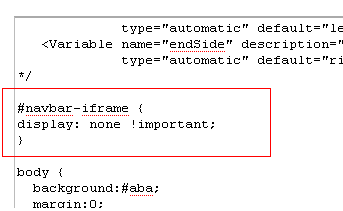
This completes the task and enjoy navbar less blog 🙂
Comments on this entry are closed.
test
it is just recently that i knew that it’s possible to remove this navbar, my blogs were just bad and so, for long time. In my opinion it’s always a better option to remove the blogger navbar because when it’s not done, the blog just looks like a novice blog. Thanks so much for the trick! Wow! This tip will grow my traffic by 200%, many people really ignore this tip. I thank you so much guy!
I bow down humbly in the presence of such gertnaess.
Wanted to drop a comment and let you know your Rss feed isnt functioning today. I tried adding it to my Yahoo reader account and got nothing.