
We use variables in powershell without declaring them. That is so nice and eases the programming. But what to do when you really want to know what is the variable type that got created? We can’t go by evaluating the value assigned to the variable but there is a simple way the *Power*Shell.
"Hallo".GetType().FullName

(4).GetType().FullName

(2.6).GetType().FullName

(Get-Date).GetType().FullName
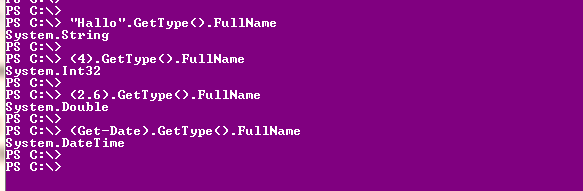
If $myvariable is the one you are using, then just try $myvariable.gettype().fullname
Hope this tiny tip helps you..happy learning..
Comments on this entry are closed.
You can also Use a direct type call to one of the following:
IsAbstract Property bool IsAbstract {get;}
IsAnsiClass Property bool IsAnsiClass {get;}
IsArray Property bool IsArray {get;}
IsAutoClass Property bool IsAutoClass {get;}
IsAutoLayout Property bool IsAutoLayout {get;}
IsByRef Property bool IsByRef {get;}
IsClass Property bool IsClass {get;}
IsCOMObject Property bool IsCOMObject {get;}
IsConstructedGenericType Property bool IsConstructedGenericType {get;}
IsContextful Property bool IsContextful {get;}
IsEnum Property bool IsEnum {get;}
IsExplicitLayout Property bool IsExplicitLayout {get;}
IsGenericParameter Property bool IsGenericParameter {get;}
IsGenericType Property bool IsGenericType {get;}
IsGenericTypeDefinition Property bool IsGenericTypeDefinition {get;}
IsImport Property bool IsImport {get;}
IsInterface Property bool IsInterface {get;}
IsLayoutSequential Property bool IsLayoutSequential {get;}
IsMarshalByRef Property bool IsMarshalByRef {get;}
IsNested Property bool IsNested {get;}
IsNestedAssembly Property bool IsNestedAssembly {get;}
IsNestedFamANDAssem Property bool IsNestedFamANDAssem {get;}
IsNestedFamily Property bool IsNestedFamily {get;}
IsNestedFamORAssem Property bool IsNestedFamORAssem {get;}
IsNestedPrivate Property bool IsNestedPrivate {get;}
IsNestedPublic Property bool IsNestedPublic {get;}
IsNotPublic Property bool IsNotPublic {get;}
IsPointer Property bool IsPointer {get;}
IsPrimitive Property bool IsPrimitive {get;}
IsPublic Property bool IsPublic {get;}
IsSealed Property bool IsSealed {get;}
IsSecurityCritical Property bool IsSecurityCritical {get;}
IsSecuritySafeCritical Property bool IsSecuritySafeCritical {get;}
IsSecurityTransparent Property bool IsSecurityTransparent {get;}
IsSerializable Property bool IsSerializable {get;}
IsSpecialName Property bool IsSpecialName {get;}
IsUnicodeClass Property bool IsUnicodeClass {get;}
IsValueType Property bool IsValueType {get;}
IsVisible
Example:
$Var.Gettype().isArray