Information in this article helps you to query a certificates expiry date, issued date, subject, issuer and other details remotely using PowerShell. Another good thing is, you don’t need admin rights to do that.
There are cases where you want to continuously monitor validity of a certificate remotely. For example, you have a bunch of web servers for which you want to monitor the certificate used by Web Service or you have a rest API which is using SSL cert and you want to monitor and alert when it expires. This script will solve such issues. Since this script relies on TCP steam data to validate the certificate details, it doesn’t need administrator rights on remote computer.
NOTE: If you are looking for a script that checks the expiry dates of all certificates in your remote systems cert store, then this script is of no use. The purpose of this script is to get certificate details using using application ports remote(like 443 for HTTPS)
This script requires two arguments,
- ComputerName : It can be a single computer name or list of computer names separate by coma.
- Port: Port number on which your application listens. For example 443 for HTTPS application. This parameter is optional and defaults to 443 when not specified.
- ExportToCSV: This switch parameter helps you export the output to CSV file for your convenience.
Code:
Copy below code to a file and save it as Get-SSLCert.ps1.
[CmdletBinding()]
param(
[parameter(Mandatory=$true)]
[string[]]$ComputerName,
[parameter(Mandatory=$true)]
[int]$Port = 443,
[switch]$ExportToCSV
)

$Outarr = @()
foreach($Computer in $ComputerName) {
Write-Host "Working on retrieving cert for $Computer" -ForegroundColor Green
try {
$tcpsocket = New-Object Net.Sockets.TcpClient($Computer,$Port)
$tcpstream = $tcpsocket.GetStream()
$sslStream = New-Object System.Net.Security.SslStream($tcpstream,$false)
$sslStream.AuthenticateAsClient($computer)
$CertInfo = New-Object system.security.cryptography.x509certificates.x509certificate2($sslStream.RemoteCertificate)
$SubjectName = @{Name="SubjectName";Expression={$_.SubjectName.Name}}
$OutObj = $CertInfo | Select-Object FriendlyName,$SubjectName,HasPrivateKey,EnhancedKeyUsageList,DnsNameList,SerialNumber,
Thumbprint,NotAfter,NotBefore,@{Name='IssuerName';Expression = {$_.IssuerName.Name}}
if($ExportToCSV) {
$Outarr += $OutObj
} else {
$OutObj
}

} catch {
Write-Warning "Unable to get cert details for `"$Computer`". $_"
}
}

if($ExportToCSV) {

$Outarr | Export-Csv c:\certdetails.csv -NoTypeInformation
}
Usage:
Query certificate details of single web server.
.\Get-SSLCert.ps1 -ComputerName google.com -Port 443
Query certificate details of multiple web server
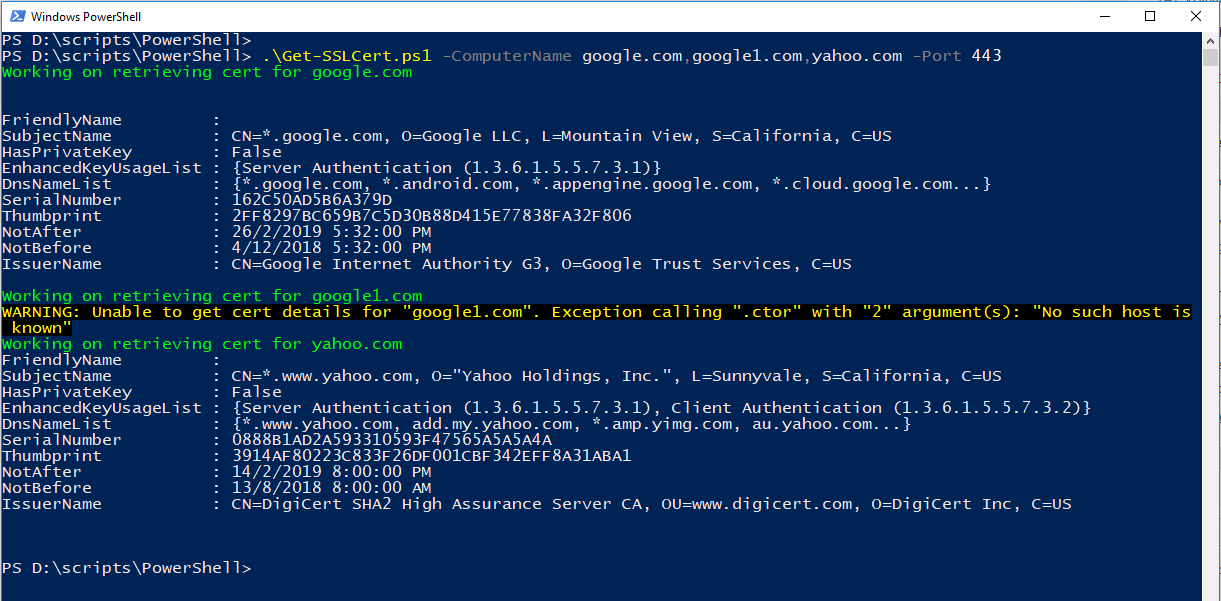
.\Get-SSLCert.ps1 -ComputerName google.com,google1.com,yahoo.com -Port 443
Export cert details to CSV
.\Get-SSLCert.ps1 -ComputerName google.com,google1.com,yahoo.com -Port 443 -ExportToCSV
Query certificate details of another application which uses TLS
.\Get-SSLCert.ps1 -ComputerName myserver.fqd.com -Port 123
Output
Hope this helps.